Task Process - Kill
The Process - Kill Task lets you stop a process on the same computer.
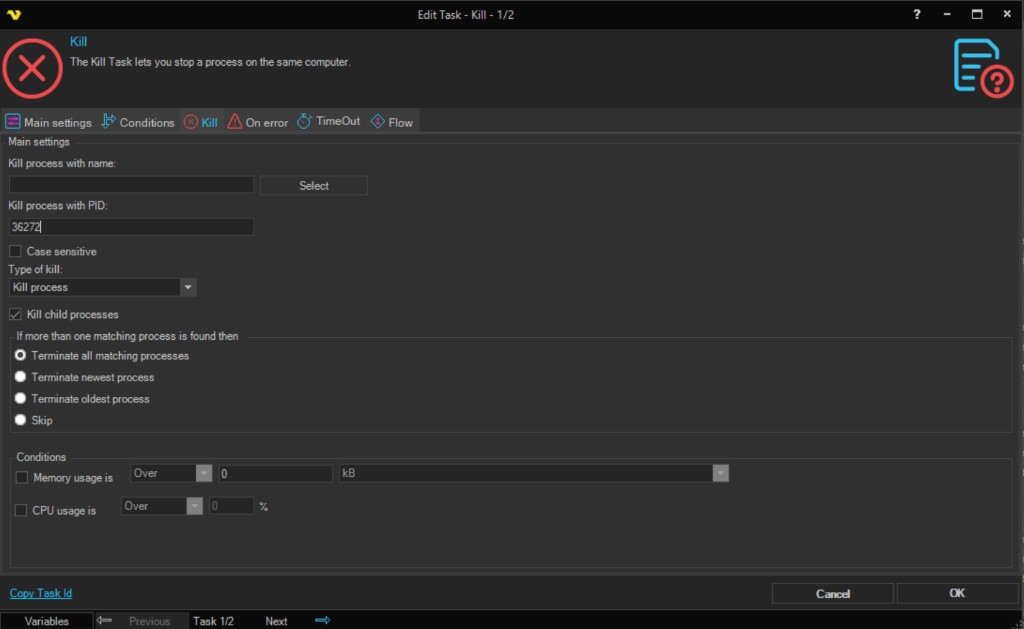
Kill process with name
Enter the process name with its extension, for example "notepad.exe"; a name without the extension matches nothing. Every process with that name on the VisualCron Server matches, whichever user or session started it. Click Select to pick from the running processes.
Kill process with PID
Enter the process id (PID) of the exact process you want to stop. Use this when several processes share the same name and you need to target one specific process.
Type a process id, or a Variable that resolves to one when the Task runs. If it does not resolve to a running process, the Task fails with Found no process(es) to kill. When a PID is entered, the process name is ignored.
Windows reuses process ids. Use a Variable set earlier in the same Job run rather than a fixed number, so the Task does not stop an unrelated process.
If no process matches, the Task fails with Found no process(es) to kill (an error cause you can clear on the On error tab). If a matching process cannot be stopped, for example because access is denied, the Task still succeeds and the process keeps running; the error is written only to the Server log. Processes named csrss, lsass, services, smss, winlogon or wmiprvse are skipped, and the Task still succeeds.
Case sensitive
Has no effect on this Task: process names are matched without regard to case.
Type of kill The kill functionality in VisualCron can be used to shut down a running application or process.
The Type of kill can be one of:
- Kill process
- Close main window
Closing the main window of the application is a nicer method because the application may need to save some settings before it is closed down. It will close down the main window like when an application is terminated by clicking in the top right corner.
The application may stay open, for example if it asks for confirmation; the Task does not wait and reports success even then.
If the process has no main window, for example one running in another session or started by a Task, Close main window kills it instead, and its child processes too if Kill child processes is selected.
Kill child processes
When checked (default), VisualCron will also terminate any child processes that were spawned by the target process.
If more than one matching process is found then
These options apply to a process name, not to a PID. A single matching process is killed, subject to Conditions. If several processes match, you have these options:
Terminate all matching processes
Kills all matching processes.
Terminate newest process
Kills only the process that was last started.
Terminate oldest process
Kills only the process that was started first.
Skip
Does not stop any process when two or more match; the Task succeeds.
Conditions
Conditions limit the kill to processes that meet resource-usage criteria. They are checked for the process the matching option selects (for example only the newest); a process that does not meet them is skipped, and the Task succeeds.
Memory usage is - the process is killed only if its memory (working set) is over or under the value, in "B", "kB", "mB", "gB" or "tB".
CPU usage is - the process is killed only if CPU usage is over or under the value, as a percentage of the whole computer measured over one second, for the first process with that name.
If both conditions are selected, only the CPU condition is used; the memory condition is ignored.