Task Process - Remote Kill
The Process - Remote Kill Task can terminate a process on another server in the network. If you want to terminate a local process, use the Kill Task instead. It connects to the remote server through WMI with the selected Credential and stops the process immediately. The remote server needs the same WMI and DCOM access as Remote Execute.
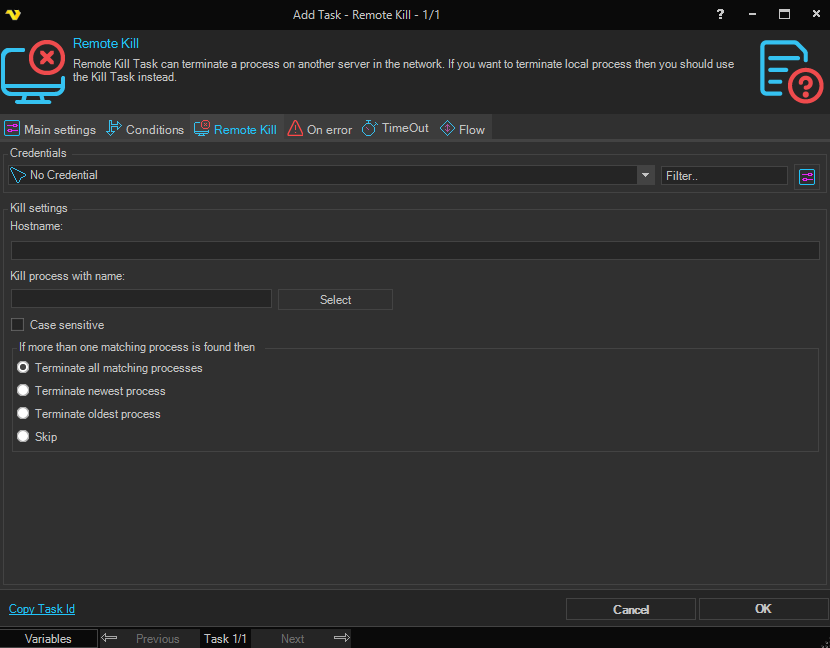
Credentials
Select the Credential to connect to the remote server with.
With No Credential, or a process name without its extension (for example "notepad" instead of "notepad.exe"), no process is stopped, and by default the Task still succeeds.
Hostname
The hostname or IP address of the remote server on which the process will be terminated. This is a required field.
Kill process with name
Enter the process name, with its extension, on the remote server. Select lists the processes on the VisualCron Server, not on the remote server.
Case sensitive
Matches the name with exact case when selected.
If more than one matching process is found then
If several processes match, you have these options:
Terminate all matching processes
Kills all matching processes.
Terminate newest process
Kills only the process that was last started.
Terminate oldest process
Kills only the process that was started first.
Skip
Stops the process only when exactly one matches; with two or more, none is stopped.
If no process matches, the Task succeeds. If WMI reports that a process could not be stopped, the Task fails with exit code 80000 plus the WMI error code; with Terminate all matching processes, only the last process's result is reported. Unlike the Kill Task, no match is not an error.