Task Image - Join
The Image join Task joins two images side by side horizontally or top to bottom vertically.
Note about Image join:
There may be restrictions in image property deviations for files to be joined successfully.
Image join > File filter for file 1 sub tab
In the File filter tab you define the first image to be joined. Read more about file filter here.
Image join > File filter for file 2 sub tab
In the File filter tab you define the second image to be joined. Read more about file filter here.
Image join > Destination sub tab
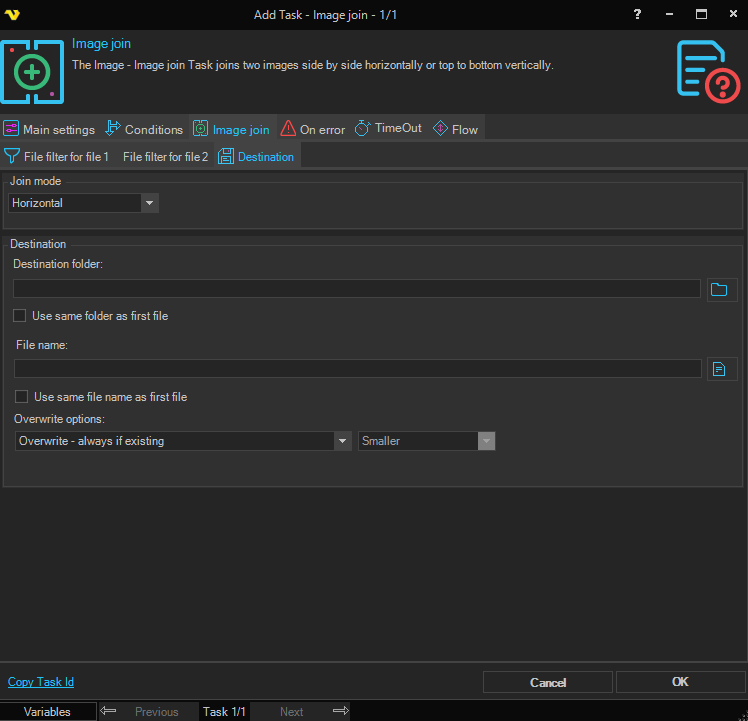
Join mode
Select the direction in which to join the two images. Options: Horizontal, Vertical.
Destination folder
The folder path where the joined image will be saved.
Use same folder as first file
When enabled, the joined image is saved to the same folder as the first source file. Disables the Destination folder field.
File name
The file name to use for the joined image.
Use same file name as first file
When enabled, the joined image uses the same file name as the first source file. Disables the File name field.
Overwrite options
Select the behavior when a file with the same name already exists at the destination:
- Overwrite - always if existing — Always overwrite the existing file.
- Overwrite - if newer — Overwrite only if the source file is newer.
- Overwrite - if destination size is — Overwrite based on a size comparison. Enables the size condition dropdown (Same, Smaller, Larger, Smaller or larger, Different).
- Append if destination is smaller - otherwise overwrite — Append content if destination is smaller; otherwise overwrite.
- Append if destination is smaller - otherwise overwrite if newer — Append if destination is smaller; otherwise overwrite only if newer.
- Append if destination is smaller - otherwise skip — Append if destination is smaller; otherwise skip.
- Do not overwrite if existing — Skip the file if it already exists.