Task Office - Excel - Copy Worksheet
The Excel - Copy worksheet Task copies an existing worksheet to a new worksheet in the same Excel file and saves the file afterwards. Column widths, row heights, hidden rows and columns, and cell formatting are copied along with the cell elements you select.
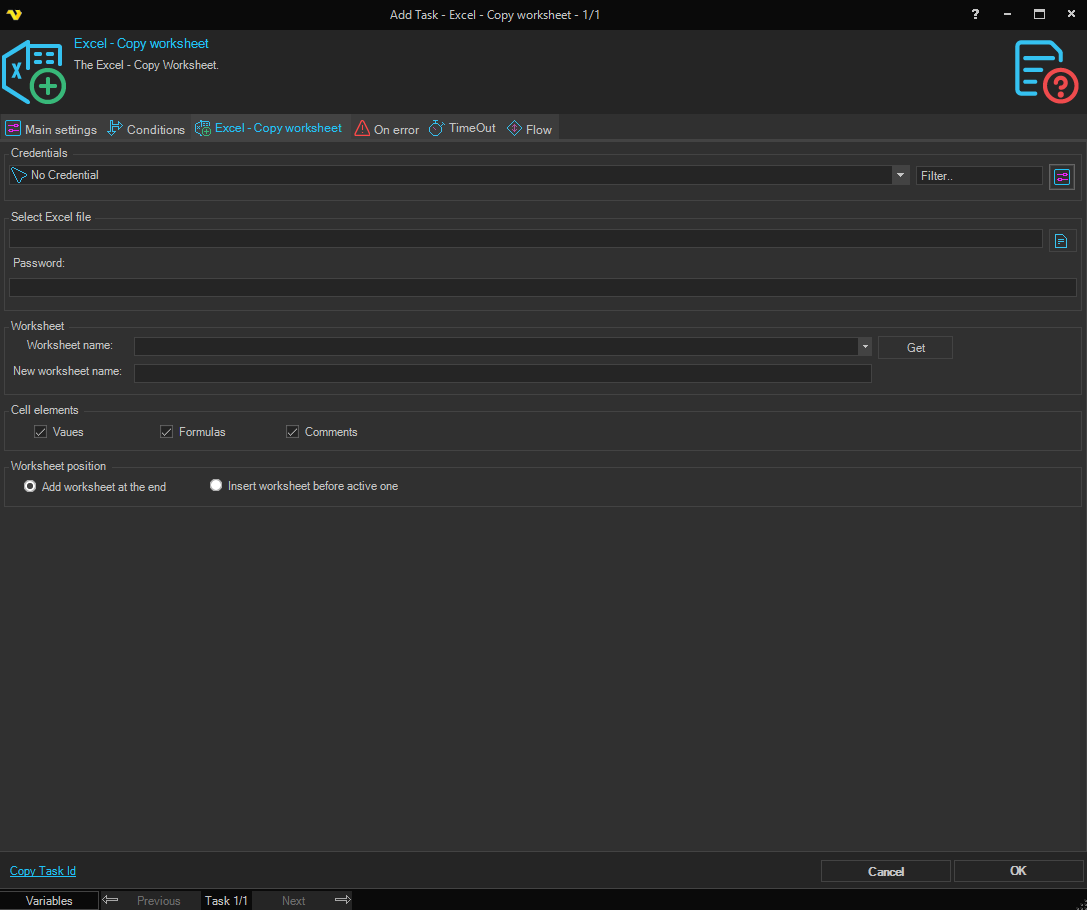
Credentials
To control a remote computer you may need to use a Credential. The Credential must match the user name and password of the user that you want to login for. Select a Credential in the combo box or click the Settings icon to open Manage credentials in order to add or edit Credentials.
Select Excel file
Select the full path to the Excel file.
Password
Enter the password for the Excel file, if it is password protected.
Worksheet
Worksheet name
Select the worksheet to copy. Click the Get button to populate the list with worksheets from the selected file. The Task fails if no worksheet with this name exists.
New worksheet name
Enter the name of the new worksheet. If a worksheet with this name already exists, VisualCron makes the name unique.
Worksheet position
- Add worksheet at the end — Adds the copy after the last worksheet in the workbook. This is the default.
- Insert worksheet before active one — Inserts the copy before the worksheet that is currently active in the workbook.
Cell elements
Select which elements of each cell to copy. All three are selected by default.
- Values — Copies the cell values.
- Formulas — Copies the cell formulas.
- Comments — Copies the cell comments.