Task IIS - Add Application Pool
The IIS - Add Application Pool Task creates a new application pool in Internet Information Services (IIS). Application pools isolate web applications from one another for improved security, reliability, and performance.
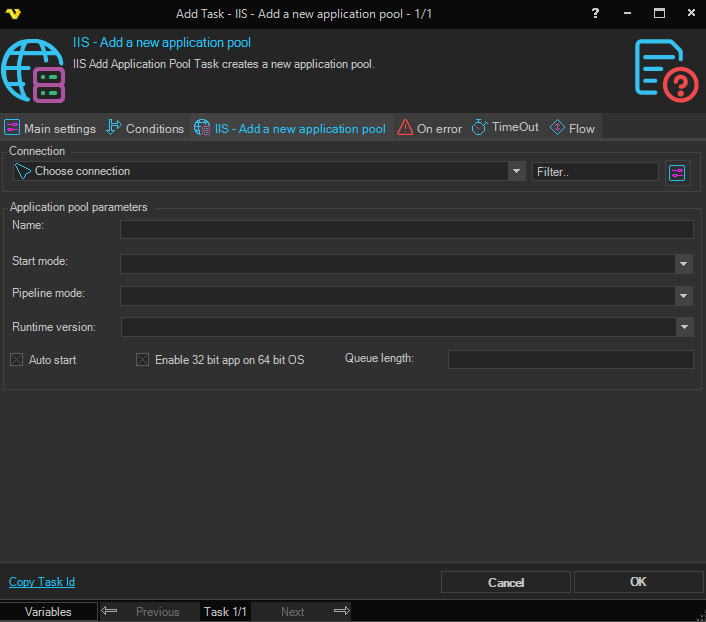
Connection
To use IIS Tasks you need to create a Connection first. Click the Settings icon to open the Manage Connections dialog.
Application pool parameters
Name
The name of the application pool to be created.
Start mode
Determines how the application pool is activated. Available options are:
- OnDemand – The application pool starts when the first request is received
- AlwaysRunning – The application pool starts immediately when IIS starts, regardless of incoming requests
Pipeline mode
The managed pipeline mode for the application pool. Available options are:
- Integrated – The ASP.NET request-processing pipeline is integrated with the IIS request-processing pipeline (recommended for modern applications)
- Classic – ASP.NET runs as an ISAPI extension alongside IIS (for legacy applications that are not compatible with Integrated mode)
Runtime version
The .NET Framework version used by the application pool. Available options are:
- No Managed Code – The application pool does not load a managed runtime (for native code or non-.NET applications)
- v2.0 – .NET Framework v2.0
- v4.0 – .NET Framework v4.0
Auto start
When checked, the application pool starts automatically when IIS starts.
Enable 32 bit app on 64 bit OS
When checked, 32-bit applications are permitted to run on a 64-bit operating system.
Queue length
The maximum number of requests IIS will queue for this application pool before returning a 503 Service Unavailable response to new requests.