Task IIS - Add App Virtual Directory
The IIS - Add App Virtual Directory Task creates a new virtual directory within an existing application in Internet Information Services (IIS). A virtual directory maps a URL path segment to a physical folder on the server, allowing content from different locations to appear under a single application.
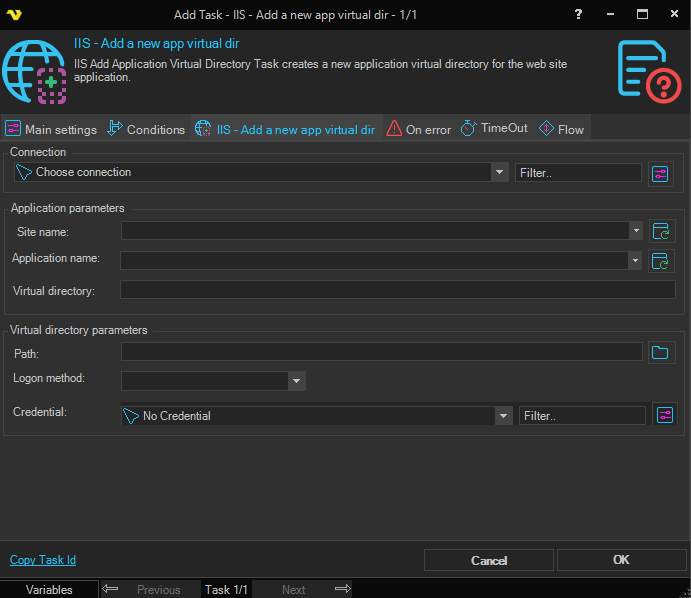
Connection
To use IIS Tasks you need to create an IIS Connection first. Click the Settings icon to open the Manage Connections dialog.
Application parameters
Web site name
The name of the parent website. Click the Refresh icon to populate the drop-down list with available websites.
Application name
The name of the parent application under which the virtual directory will be created. Click the Refresh icon to populate the drop-down list with available applications for the selected website.
Virtual directory path
The virtual path (alias) for the new virtual directory within the application (e.g., /images).
Virtual directory parameters
Path
The physical file system path that the virtual directory maps to. Click the Browse button to select a folder.
Logon method
The authentication method IIS uses when accessing the physical path with the specified credential. Available options are:
- Interactive – Interactive logon session
- Batch – Batch logon session
- Network – Network logon (credentials passed over the network)
- ClearText – Clear text logon
Credential
The credential used to access the physical path. Select a Credential in the drop-down or click the Settings icon to open Manage credentials to add or edit Credentials.