Task Messaging - SysLog
The SysLog Task sends a message to a SysLog server over UDP or TCP. SysLog is a standard way to collect log messages from many kinds of systems and devices, such as printers, routers and firewalls, in one central place.
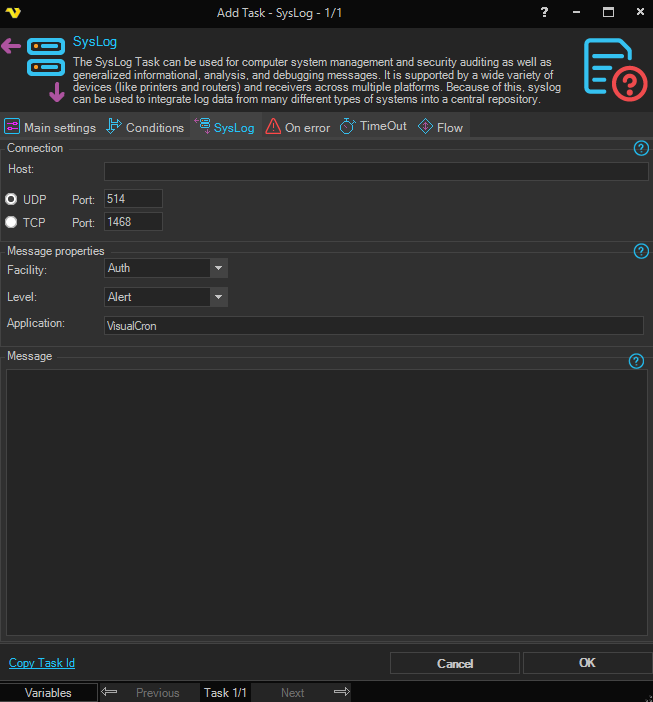
The Task sends the message in RFC 3164 format over plain UDP or TCP, without encryption, so anyone who can see the network traffic can read it.
The Main settings, Flow, On error, Conditions and TimeOut tabs are the same for every Task; see Job - Tasks.
SysLog tab
Connection
-
Host: the host name or IP address of the SysLog server
The Task window does not require a value.
-
UDP: sends the message over UDP to the Port next to it, "514" by default; selected on a new Task
-
TCP: sends the message over TCP to the Port next to it, "1468" by default
Variables are resolved in Host and in both Port fields.
Message properties
- Facility: the SysLog facility of the message: "Kernel", "User", "Mail", "Daemon", "Auth", "Syslog", "Lpr", "News", "UUCP", "ClockDaemon", "SecurityAuthorization", "FTP", "NTP", "LogAudit", "LogAlert", "Cron", or "Local0" to "Local7"
- Level: the severity of the message: "Emergency", "Alert", "Critical", "Error", "Warning", "Notice", "Information" or "Debug"
- Application: the application name sent with the message, "VisualCron" by default; Variables are resolved
A new Task has Facility "Auth" and Level "Alert".
Message
The text of the message. Variables are resolved.
Output and errors
The Task writes no output. When the message is sent, the Task reports success.
Over UDP, the Task gets no confirmation that the message arrived. If the message cannot be sent, for example because the host is unknown, a Port is not a number, or the server refuses the TCP connection, the error is written to the Server log, and the Task reports success.