Task Messaging - Amazon SNS - Publish Message
The Amazon SNS - Publish Message Task publishes a message to an Amazon SNS topic, target endpoint or phone number.
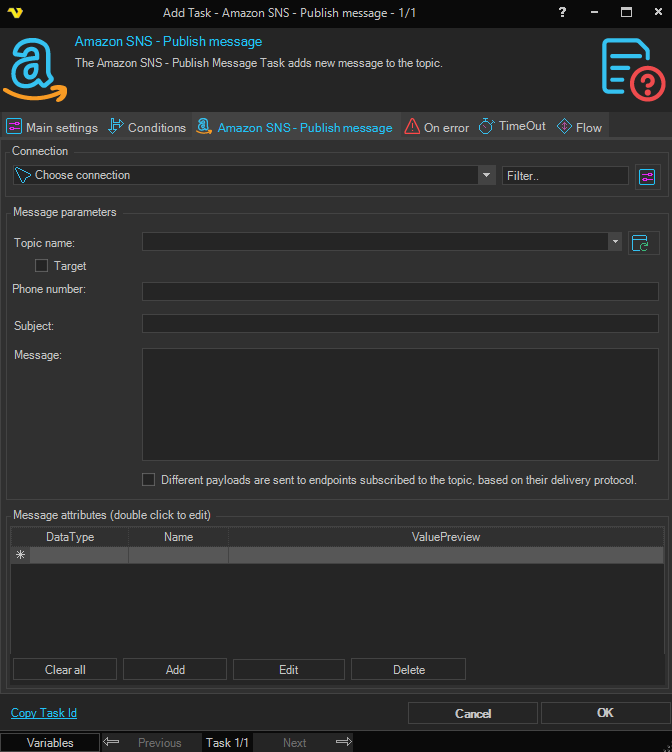
Connection
Select an Amazon Connection used to authenticate against the AWS account that hosts the SNS topic. Click the Settings icon to open the Manage Connections dialog.
Topic name
The name of the SNS topic to publish to. Click the Refresh icon to populate the drop-down with the topics available on the selected Connection. Either Topic name or Phone number must be set.
Target ARN
When checked, the value entered in Topic name is treated as a target ARN (for example a platform endpoint) instead of a topic name.
Subject
The subject line that will be used when the message is delivered as an email or SMS notification.
Phone number
The destination phone number for an SMS publish. Either Phone number or Topic name must be set.
Message structure
When checked, the Message field is treated as a JSON document that contains a separate message body for each delivery protocol (for example default, email, sms). When unchecked, the same Message string is delivered to all subscribers regardless of protocol.
Message
The body of the message to publish. When Message structure is checked, the field expects a JSON object keyed by delivery protocol.
Message attributes
A grid of optional message attributes attached to the publish request. Use the buttons next to the grid to manage the entries:
- Add - opens the Add/Edit dialog to create a new attribute
- Edit - opens the Add/Edit dialog for the selected row (double-clicking a row also works)
- Delete - removes the selected row
- Clear - removes every attribute
The Add/Edit Message Attribute dialog has the following fields:
- Data type - the SNS data type of the attribute (String, String.Array, Number, Binary)
- Name - the attribute name
- Value - the attribute value; click the Variables icon to insert a Variable
- Is null - when checked, the attribute is published with a null value and the Value field is disabled