Task System - Environment - Delete Variables
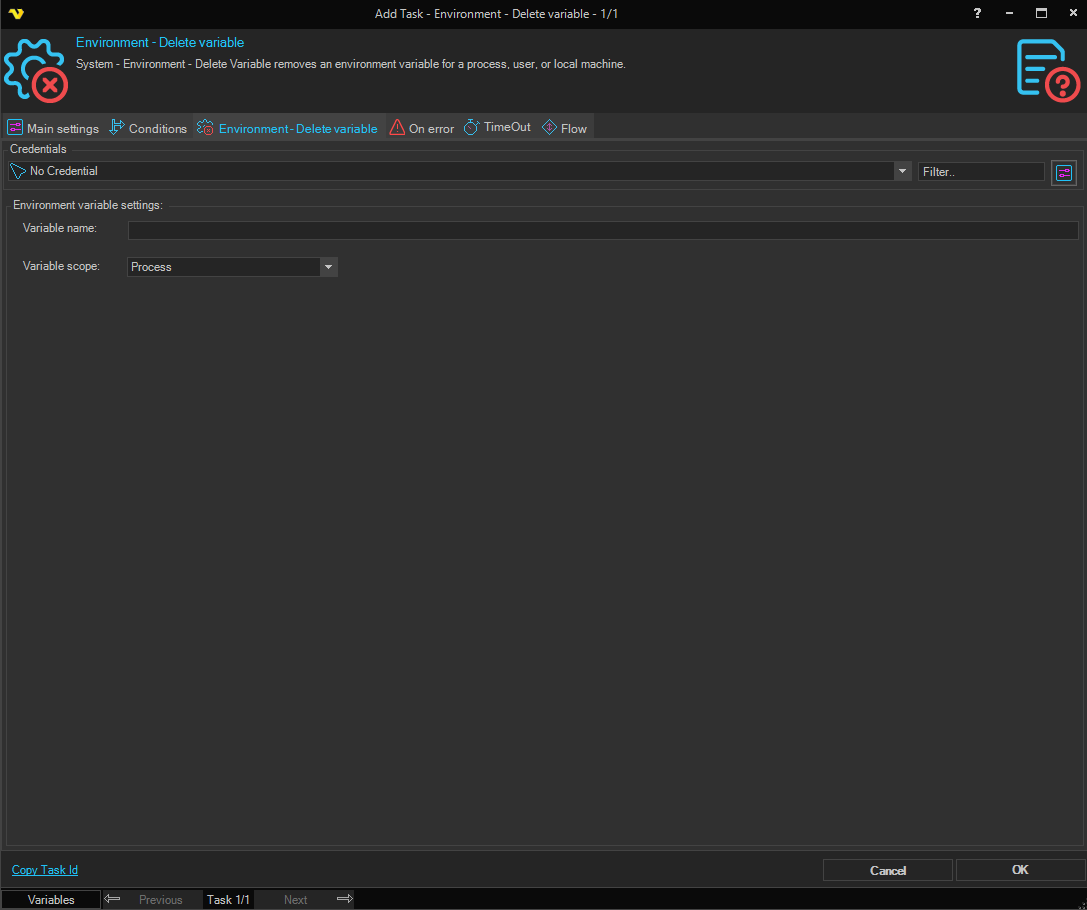
The Environment - Delete variable Task removes an environment variable of the VisualCron Server process, of a user or of the VisualCron Server computer.
The Main settings, Flow, On error, Conditions and TimeOut tabs are the same for every Task; see Job - Tasks.
The Task works on the VisualCron Server computer only.
Environment - Delete variable tab
-
Credentials: the Credential the Task runs as. Required for the "User" scope, where the Task removes a variable of that Credential's user. This needs the Credential's default logon settings (local logon, with the profile loaded). Without a Credential, the Task runs as the account of the VisualCron Server service. Select a Credential, or click the Settings icon to open Manage credentials; see Global - Credentials
-
Variable name: the name of the variable to remove
-
Variable scope: "Process" (default), "User" or "Machine"
- "Process": the environment of the VisualCron Server process. The change applies only to that process and lasts until the VisualCron Server restarts
- "User": the user variables of the Credential's user, stored in that user's
Environmentregistry key (HKEY_CURRENT_USER\Environmentfor a logged-on user) - "Machine": the system variables of the computer, stored in
HKEY_LOCAL_MACHINE\SYSTEM\CurrentControlSet\Control\Session Manager\Environment
A change in the "User" or "Machine" scope does not reach programs that are already running, including the VisualCron Server.
The Task removes the variable without a prompt. VisualCron cannot undo it.
Output and errors
On success, the output is "The variable was deleted successfully". With "User", the Task fails when the variable does not exist. With "Process" or "Machine", a variable that does not exist is not an error, and the Task reports success.