Task System - Environment - Get Variable
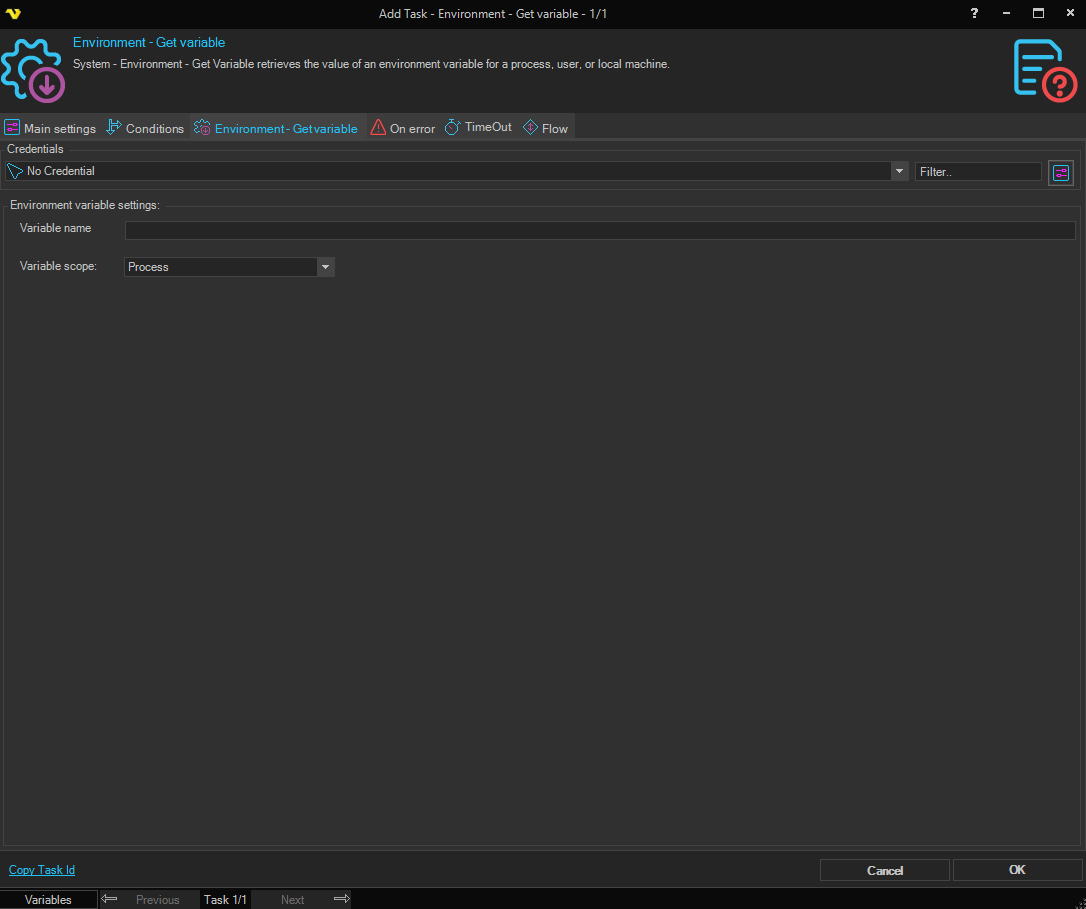
The Environment - Get variable Task writes the value of an environment variable of the VisualCron Server process, of a user or of the VisualCron Server computer to the Task output.
The Main settings, Flow, On error, Conditions and TimeOut tabs are the same for every Task; see Job - Tasks.
The Task works on the VisualCron Server computer only.
Environment - Get variable tab
-
Credentials: the Credential the Task runs as. Required for the "User" scope, where the Task reads a variable of that Credential's user. This needs the Credential's default logon settings (local logon, with the profile loaded). Without a Credential, the Task runs as the account of the VisualCron Server service. Select a Credential, or click the Settings icon to open Manage credentials; see Global - Credentials
-
Variable name: the name of the variable to read
-
Variable scope: "Process" (default), "User" or "Machine"
- "Process": the environment of the VisualCron Server process: the values it had when the VisualCron Server started, plus changes made since by Tasks in the "Process" scope
- "User": the user variables of the Credential's user, stored in that user's
Environmentregistry key (HKEY_CURRENT_USER\Environmentfor a logged-on user) - "Machine": the system variables of the computer, stored in
HKEY_LOCAL_MACHINE\SYSTEM\CurrentControlSet\Control\Session Manager\Environment
Output and errors
The output is the value of the variable. When the variable does not exist, the output is empty, and the Task reports success.