Task File - Set Attributes
The File - Set attributes Task lets you set attributes for one or more folders or files.
Set attributes > Main settings sub tab
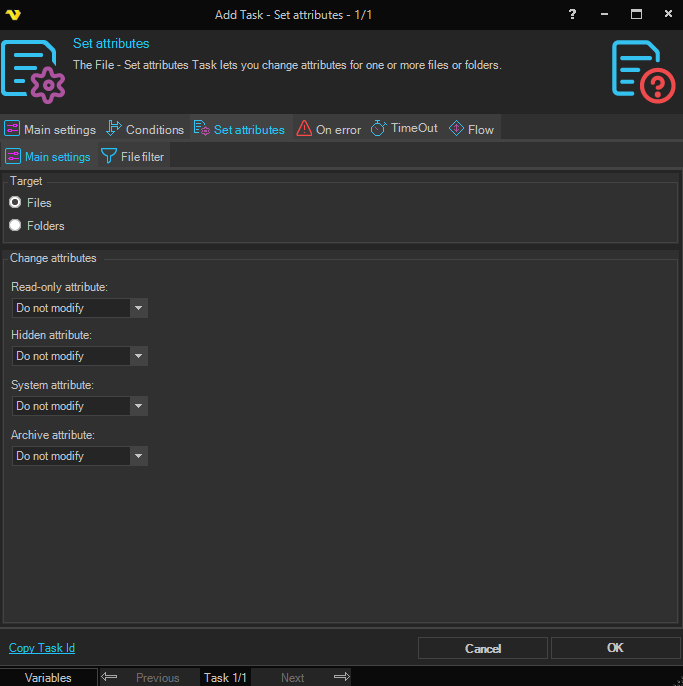
Target
Select if you want to target by File or Folder. If you set Folder you use the Folder Filter Dialog and it will use the base folder (and sub folders if you select that). If you select Files you use the File filter dialog.
Change attributes
For each attribute, select whether to turn it on, turn it off, or leave it unchanged. Each attribute has three options: Do not modify, Turn on, Turn off.
Read-only attribute
Controls the read-only attribute on the matching files or folders.
Hidden attribute
Controls the hidden attribute on the matching files or folders.
System attribute
Controls the system attribute on the matching files or folders.
Archive attribute
Controls the archive attribute on the matching files or folders.
Set attributes > Folder filter sub tab
The standard VisualCron Folder filter is used to specify one or more folders to set attributes for. This tab is only visible when Folders is selected in Target.
Set attributes > File filter sub tab
The standard VisualCron File filter is used to specify one or more files to set attributes for. This tab is only visible when Files is selected in Target.