Task File - Set Folder Permissions
The Folder - Set folder permissions Task lets you apply security permissions on one or more folders.
Set folder permissions > Main settings sub tab
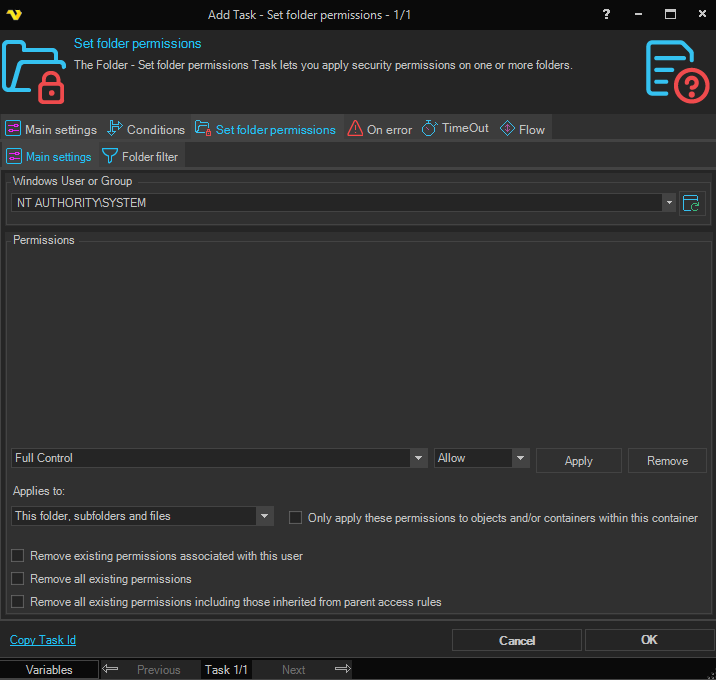
Windows User or Group
Enter or click Refresh button to fill a list of users and groups.
Permissions
Select an access right and access type, then click Apply to add a rule to the list. Click Remove to delete the selected rule.
Access right
The file system permission to apply. Options: FullControl, Modify, ReadAndExecute, Read, Write, AppendData, ChangePermissions, CreateDirectories, CreateFiles, Delete, DeleteSubdirectoriesAndFiles, ExecuteFile, ListDirectory, ReadAttributes, ReadData, ReadExtendedAttributes, ReadPermissions, Synchronize, TakeOwnership, Traverse, WriteAttributes, WriteData, WriteExtendedAttributes.
Access type
Whether the permission is allowed or denied. Options: Allow, Deny.
Applies to
Specifies which objects the permissions apply to. Options: This folder only, This folder subfolders and files, This folder and subfolders, This folder and files, Subfolders and file only, Subfolders only, Files only.
Only apply these permissions to objects and/or containers within this container
When enabled, restricts the permissions to direct children of the folder rather than propagating them further. Only available when Applies to is set to something other than "This folder only".
Remove existing permissions associated with this user
Removes all existing permissions associated with the selected user before applying the new permissions.
Remove all existing permissions
Removes all existing permissions before applying the new permissions.
Remove all existing permissions including those inherited from parent access rules
Removes all existing permissions including those inherited from parent access rules before applying the new permissions.
Set folder permissions > Folder filter sub tab
This Task uses the standard VisualCron Folder filter to filter out folders to set permissions for.