Task Messaging - Microsoft Teams - Add Channel Message
The Microsoft Teams - Add Channel Message Task adds a new message to a channel in Microsoft Teams. The Task either posts a new message at the top level of the channel, or posts the text as a reply to an existing message in that channel.
The Task is using the Office365 Connection.
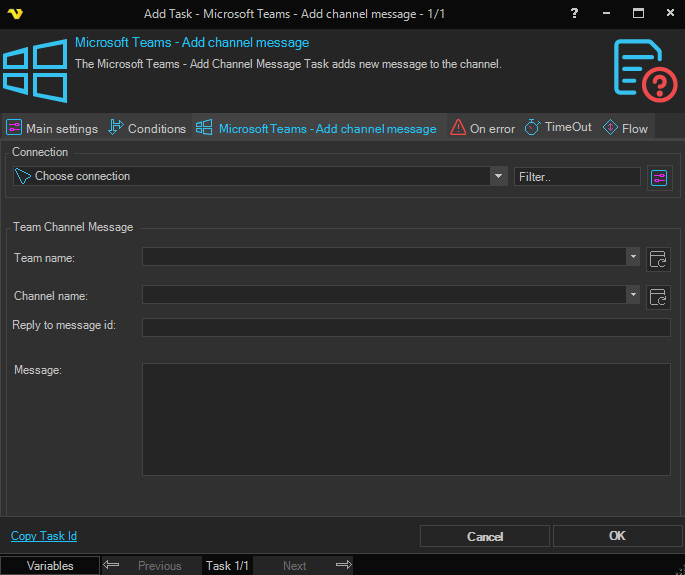
Connection
Connection
Select the Office365 Connection that the Task should use. Only Connections of the Office365 type are listed. Use the Filter field to narrow the list, or click the Settings icon to open Manage Connections in order to add or edit a Connection.
The teams and channels that the Task can reach are the teams that the account used when authenticating the Office365 Connection has joined. The Connection must be authenticated with the Group.ReadWrite.All and User.ReadWrite.All Microsoft Graph permissions.
A Connection must be selected before the Task can be saved.
Team Channel Message
Team name
The display name of the team that owns the channel. Click the Refresh button to the right of the field to fetch the teams that the authenticated account is a member of, then pick one from the dropdown. The button is enabled once a Connection has been selected. A value may also be typed manually or built from Variables.
The name is compared to the team display name without regard to case, but it must otherwise match exactly. If no team with that name is found, the Task fails with The team '<name>' is not found.
The field must not be empty.
Channel name
The display name of the channel to post the message in. Click the Refresh button to the right of the field to fetch the channels of the selected team. The button is enabled once both a Connection and a Team name have been set. Changing the Team name clears the channel list, so refresh the channels again after switching team.
As with the team, the name is compared to the channel display name without regard to case and must otherwise match exactly. If no channel with that name is found, the Task fails with The channel '<name>' is not found.
The field must not be empty.
Reply to message id
Optional. Leave the field empty to post a new message at the top level of the channel. Enter the id of an existing channel message to post the text as a reply to that message instead.
The field is cleared when the Team name or Channel name changes. The message id is typically taken from the result of the Microsoft Teams Event Trigger, for example {TRIGGER(jobId|triggerId|MSTeams.Result.Id)}.
Message
The body of the message to post. Variables are supported and are resolved when the Task runs.
Output
On success, standard output holds the identifiers of what was posted, separated by tabs:
- When a new message was posted: the team id, the channel id and the message that was sent
- When a reply was posted: the team id, the channel id, the message id that was replied to and the message that was sent
If the message cannot be posted, the Task fails and the error returned by Microsoft Graph is reported as the Task error. The Task makes up to three attempts at authenticating and sending before the error is raised. Enable Extended Task debug logging on the Main settings tab to write the details of each failed attempt to the log.