Task Net - Web Service/WCF Execute
The Web Service/WCF Execute Task calls a method of a SOAP web service or a WCF service and returns the method's return value as the output of the Task. You can also send a SOAP body that you write yourself.
The Main settings, Flow, On error, Conditions and TimeOut tabs are the same for every Task; see Job - Tasks.
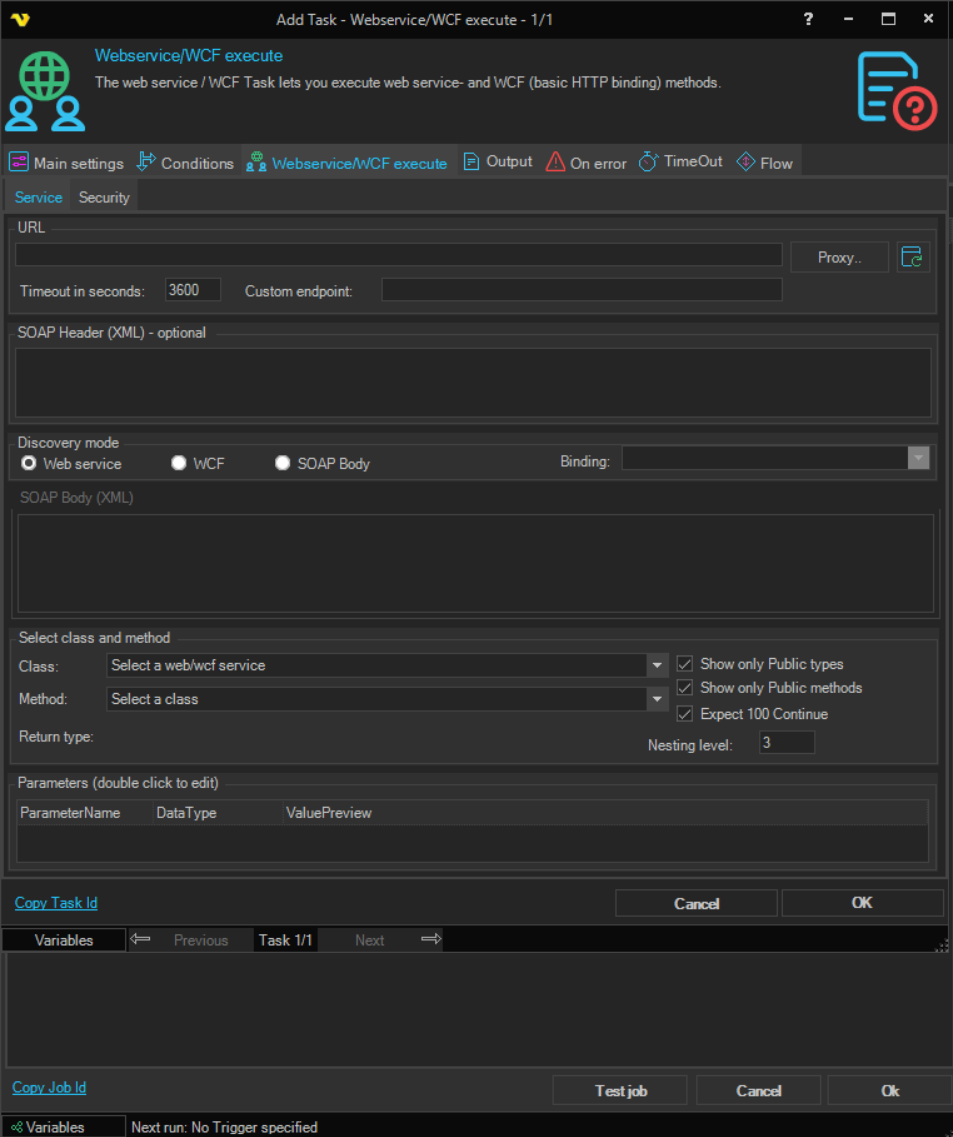
Service tab
-
URL: the address of the service, for example
http://<host>/<service>.asmxTo use another port, put it after the host name, as in
http://<host>:<port>/<service>.asmx. -
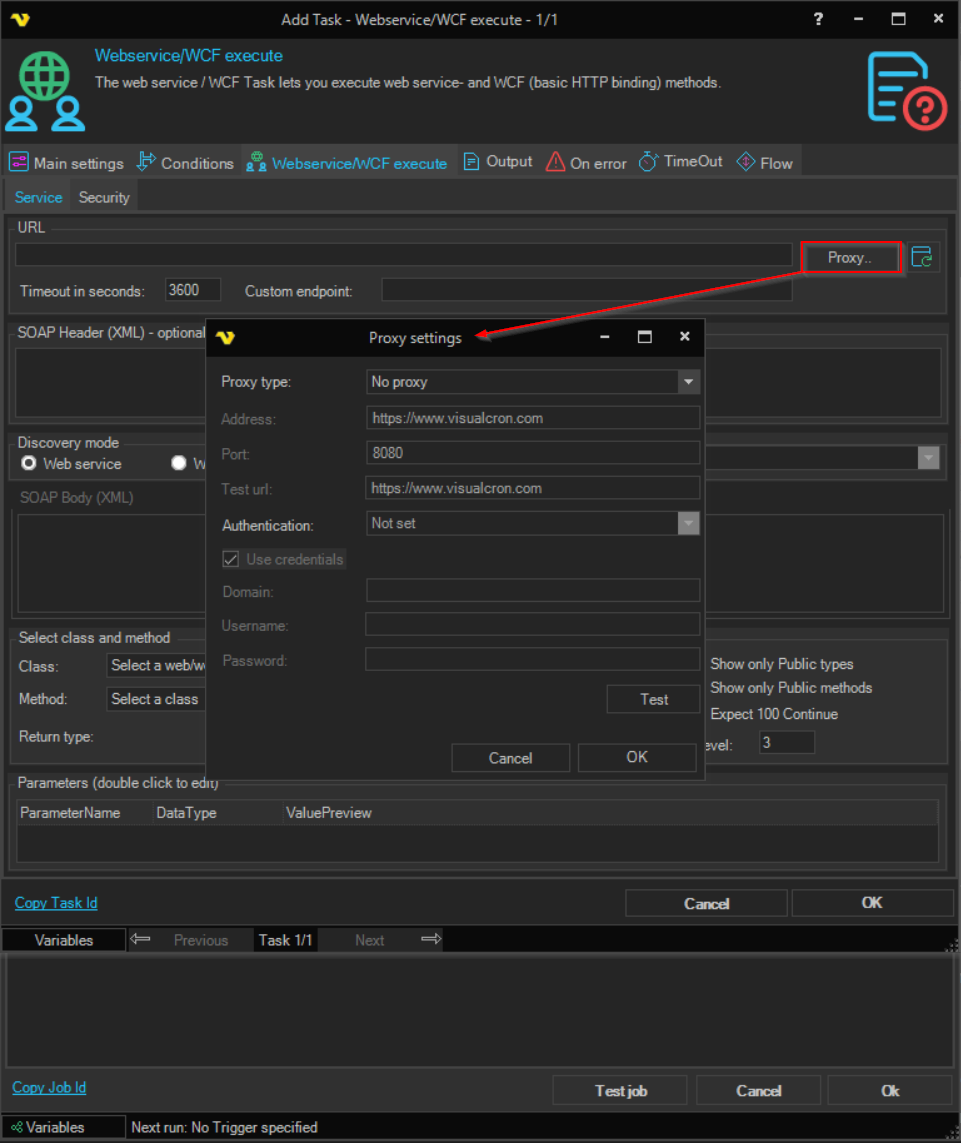
Proxy..: opens the proxy settings window, to reach the service through a proxy
With "Web service" and "WCF", the proxy is used when VisualCron reads the service description; the method call itself does not go through the proxy. With "SOAP Body", the proxy is not used.
-
Discovery mode: "Web service", "WCF" or "SOAP Body"
With "SOAP Body", you write the SOAP envelope yourself, and the Server posts it to URL. In this mode, Custom endpoint, Timeout in seconds, Expect 100 Continue, the proxy and the authentication settings on the Security tab are not used.
-
Custom endpoint: optional. An endpoint URL that replaces the endpoint of the service
Used with "Web service". With "WCF", use Binding instead. With "SOAP Body", the Server posts to URL.
-
Timeout in seconds: how long the method call can take
A new Task has "3600". With "WCF", the value limits opening the connection and sending the call, and "0" means no time limit. With "Web service", enter a value greater than "0". With "SOAP Body", the setting is not used. To limit how long the whole Task can run, use the Task's TimeOut tab (see Task - Timeout).
-
SOAP Header (XML) - optional: with "Web service" and "WCF", a SOAP header to add to the message, for example for a simple authentication scheme
With "SOAP Body", this box is SOAP Action (string) - optional: the SOAP action to send. If it is empty, VisualCron generates one.
-
SOAP Body (XML): "SOAP Body" only. The SOAP envelope to send, for example:
<soapenv:Envelope xmlns:soapenv="http://schemas.xmlsoap.org/soap/envelope/" xmlns:tem="http://tempuri.org/"><soapenv:Header/><soapenv:Body><tem:ExportData><tem:exportName>export-name</tem:exportName></tem:ExportData></soapenv:Body></soapenv:Envelope> -
Binding: with "WCF", the binding to use, which you can choose after the classes and methods are loaded
The binding tells VisualCron how to communicate with the service.
-
Class: the class that has the method
-
Show only Public types: selected by default, so only public classes are loaded
Clear it to also load classes with other access modifiers.
-
Method: the method to call
When you change Class, the list shows the methods of that class.
-
Show only Public methods: selected by default, so only public methods are loaded
Clear it to also load methods with other access modifiers.
-
Expect 100 Continue: "Web service" only. Selected by default, so the request sends an
Expect: 100-continueheaderIf the server returns HTTP error 417, clear this check box.
-
Return type: the type of the method's return value, which the Task converts to text for its output
-
Nesting level: how many levels deep VisualCron reads complex types when it loads the classes and methods
The default is "3". Increase it if nested parameter types are not fully loaded; lower it if loading is slow.
-
Parameters (double click to edit): double-click a parameter to set its value
The input form depends on the type of the value.
Security tab
-
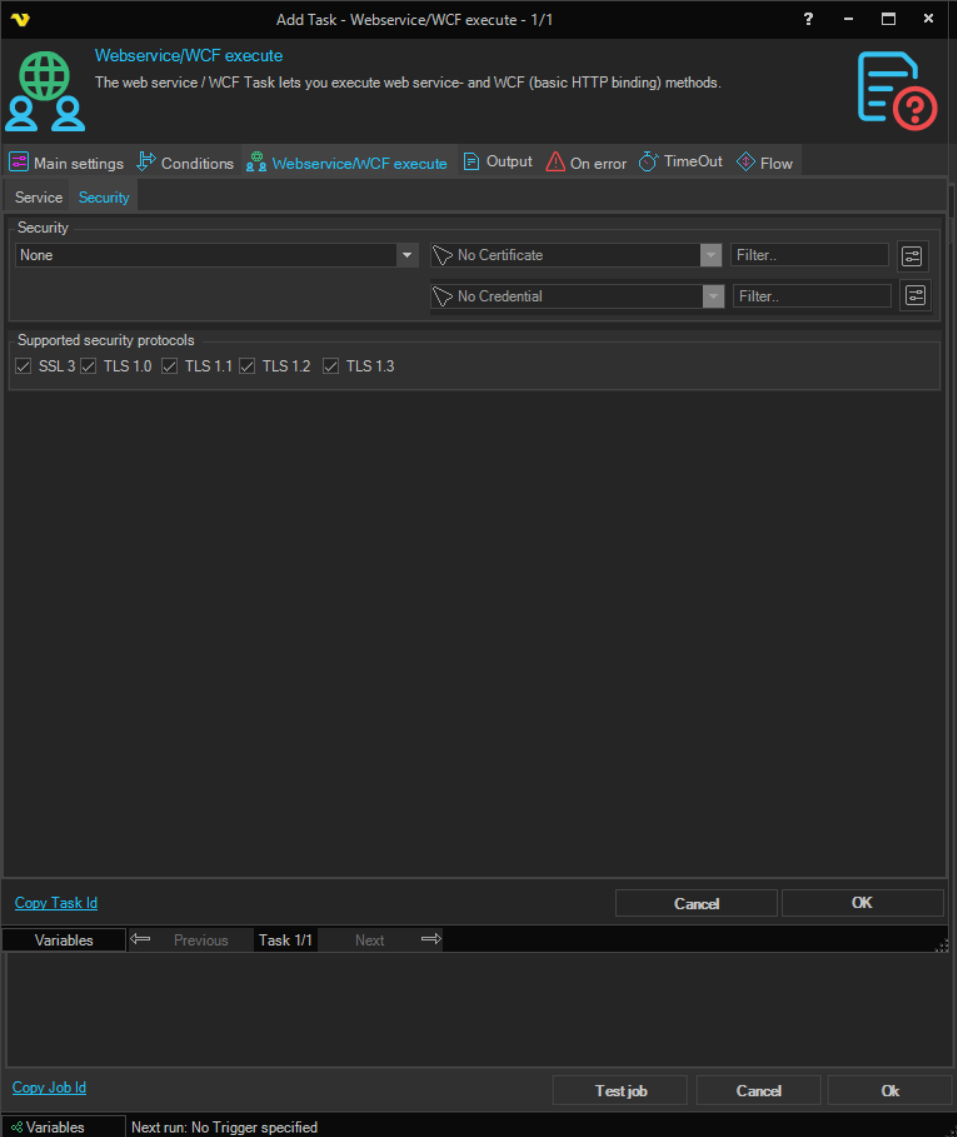
Supported security protocols: the protocols the Task can use with an "https://" URL: "SSL 3", "TLS 1.0", "TLS 1.1", "TLS 1.2" and "TLS 1.3"
All are selected by default.
-
Security: the authentication method:
- "None" (default): no authentication
- "Basic": the user name and password of the selected Credential, Base64 encoded. Base64 is an encoding, not encryption. With "WCF", "Basic" is not applied, and the call is sent without the Credential
- "Digest": the Credential is used only to read the service description. The method call itself is sent without Digest authentication
- "Windows": Windows authentication with the selected Credential
- "Certificate": "Web service" only. Presents the client certificate selected in Certificate. With "WCF", the call fails
- "Transport": the transport-level security of the WCF binding
-
Credential: required for "Basic", "Digest" and "Windows", and available only for them (see Global - Credentials)
-
Certificate: required for "Certificate". The client certificate, from Global - Certificates
With "SOAP Body", only Supported security protocols is used; the request is sent without authentication.
The Task accepts every server certificate and has no setting to check it, so it cannot tell the real server from another server that answers at the same address. With "Basic", anyone who can see the traffic can read the user name and password. Use "Basic" only with an "https://" URL on a network path that you trust.
Output tab
On the Task window's Output tab, choose how the return value is written to the output:
-
ToString representation of output (default): the text of the return value
Arrays are separated by commas.
-
XML representation of output: the return value as XML
Troubleshooting
If the Task fails with the error The HTTP request is unauthorized with client authentication scheme 'Ntlm'. The authentication header received from the server was 'NTLM'., the user name or password in the Credential is wrong.