Task Net - Check Port
The Check Port Task checks whether a host accepts connections on a port.
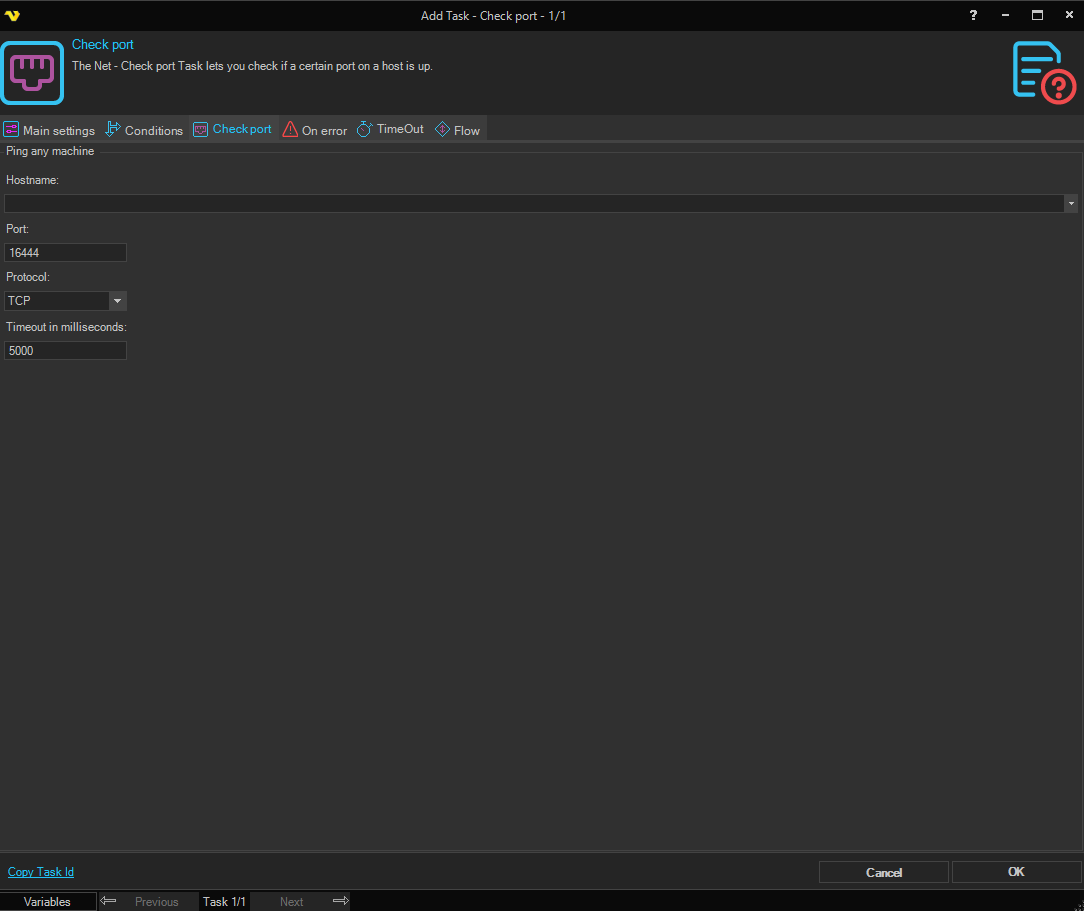
The Main settings, Flow, On error, Conditions and TimeOut tabs are the same for every Task; see Job - Tasks.
-
Hostname: the host name or IP address to check
The list also shows the computers on the network.
-
Port: the port to check
The default, "16444", is the port of the VisualCron Server, so change it to the port you want to check.
-
Protocol: "TCP" (default) or "UDP"
-
Timeout in milliseconds: how long sending and receiving can take, "5000" by default
With "TCP", it does not limit the connection attempt, so an unreachable host can take as long as Windows waits for a connection. To limit how long the Task runs, use the Task's TimeOut tab (see Task - Timeout).
When the check passes, the output is "Connected". Otherwise the output is "Not connected" and the Task fails.
With "UDP", a missing reply counts as success, because an open UDP port does not have to answer. The Task fails only when the host reports that the port is closed. A host that is down, or a firewall that drops the traffic, passes the check. Use "TCP" when you need a reliable result.