Task Net - Serial Send
The Serial send Task lets you communicate with a wide range of devices that uses COM port interface.
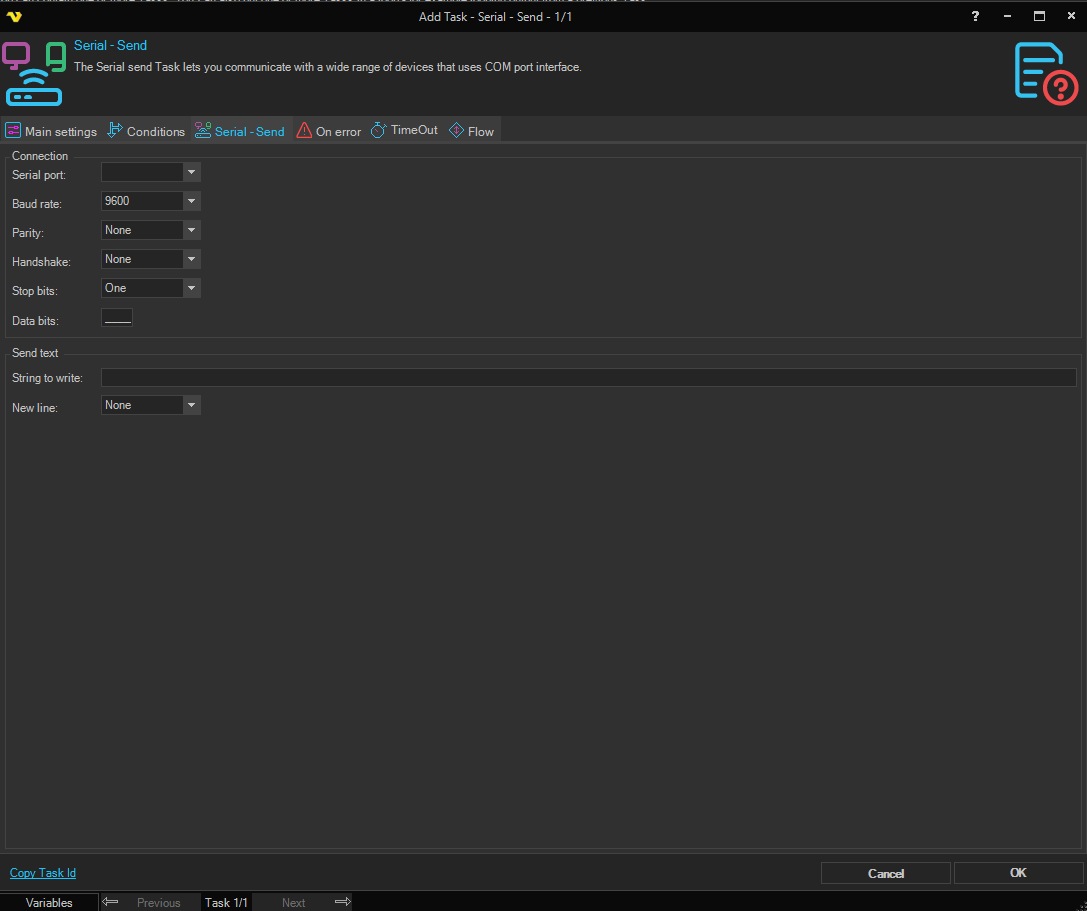
Connection group
Serial port
The COM port to connect to (e.g. COM1, COM2). The dropdown lists all COM ports detected on the VisualCron server. Default is COM1.
Baud rate
The communication speed in bits per second. Available options: 150, 300, 600, 1200, 2400, 4800, 9600, 19200, 38400, 57600, 115200. Default is 9600.
Data bits
The number of data bits per byte. Valid range is 5–8. Default is 8.
Handshake
The flow-control protocol for serial port transmission. Options: None (default), XOnXOff, RequestToSend, RequestToSendXOnXOff.
Parity
The parity-checking protocol. Options: None (default), Odd, Even, Mark, Space.
Stop bits
The number of stop bits per byte. Options: None, One (default), Two, OnePointFive.
Send text group
New line
An optional newline character appended to the text before sending. Options: None (default), Cr (carriage return, used on Unix/Linux), CrLf (carriage return + line feed, used on Windows).
String to write
The text to send to the device over the serial connection.