Download Step
The Download step is triggered automatically when a web page presents something for download - this could be initiated originally by a click.
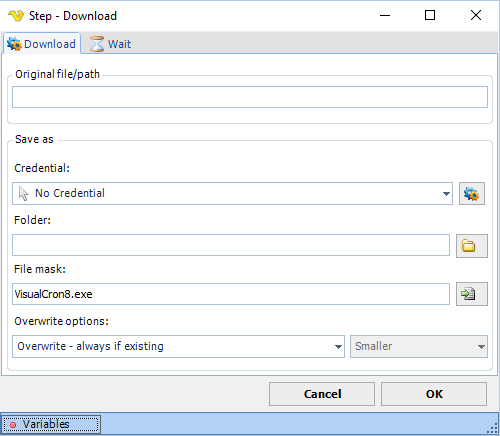
Download tab
Original file/path
The direct URL to download from. Required when Force download is checked.
Force download
When checked, downloads directly from the URL specified in the Original file/path field. When unchecked, the Element tab becomes available and the download is triggered by clicking a web element.
Credential
If you need to save the file on a network resource you probably need a Credential to elevate the rights. Use an existing or add one.
Folder
The local destination folder where the file will be saved.
File mask
The destination file name or file mask.
Overwrite options
Controls what happens when a file with the same name already exists at the destination. Options:
- Overwrite - always if existing (default) — always replace the destination file
- Overwrite - if destination size is — replace based on size comparison (activates the size dropdown)
- Do not overwrite if existing — skip the file if it already exists
Overwrite size
Active only when Overwrite options is set to "Overwrite - if destination size is". Options: Same, Smaller, Larger, Smaller or larger, Different.
Element tab
Available when Force download is unchecked. Defines the web element to click in order to trigger the download. Supports three selection modes: Relative (by element path), By position (X/Y coordinates), and By search (selector, attribute, regex, and position).
Variable tab
Save local path to Variable
When checked, saves the local path of the downloaded file to a variable. Configure the target variable in the fields below.
Wait tab
Controls how long the step waits before and after performing the action.