Print Step
The Print step prints the current page using the configured printer settings.
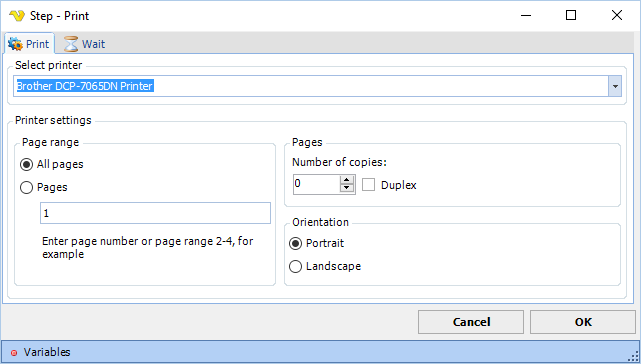
The Print step exposes the most common printer settings.
Print tab
Select printer
The printer to use. Select from the dropdown list of printers available on the system.
Page range
Controls which pages are printed.
All pages
When selected, prints all pages. Default is selected.
Pages
When selected, prints only the pages specified in the adjacent field. Enter a page number or a page range, for example 2-4.
Number of copies
The number of copies to print. Default is 1.
Duplex
When checked, prints on both sides of the page. Default is unchecked.
Orientation
Controls the page orientation.
Portrait
When selected, prints in portrait orientation. Default is selected.
Landscape
When selected, prints in landscape orientation.
Wait tab
Controls how long the step waits before and after performing the action.