Robot Task Activities - Excel Macros
The Excel Macros category contains a single activity for running a macro in an Excel workbook.

The activity must be nested inside a New Excel or Attach to Excel container activity. See Excel.
Run Macro
Runs an Excel macro with arguments.
| Setting | Description |
|---|---|
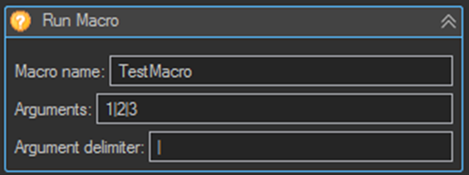
| Macro name | The name of the macro in the Excel workbook file. |
| Arguments | The arguments line supplied to the macro. |
| Argument delimiter | The character used as a delimiter to split the arguments line into individual arguments. |
In the example above, an arguments line of 1|2|3 with an argument delimiter of | passes three arguments to TestMacro.
Tips
- The workbook containing the macro must already be open. Use an Excel Workbook Open Workbook activity before Run Macro.
- The workbook must be saved in a macro enabled format such as
.xlsm, and macros must be permitted by the Excel trust settings on the server the job runs on. - Choose an Argument delimiter that cannot appear inside the argument values themselves. A comma is a poor choice when arguments contain numbers formatted with thousands separators.
- Disable DisplayAlerts on the parent Excel container if the macro can raise a dialog. Under an unattended job there is nobody to dismiss it and the task will hang.
- Where the work can be done with the standard Cell, Row, and Column activities, prefer those over a macro. The logic stays visible in the Robot Task rather than being hidden inside the workbook.