Command - Download File(s)
The download command is able to receive one or more files recursively if needed.
For download, VisualCron uses the remote file filter to specify files that should be downloaded.
Download sub tab
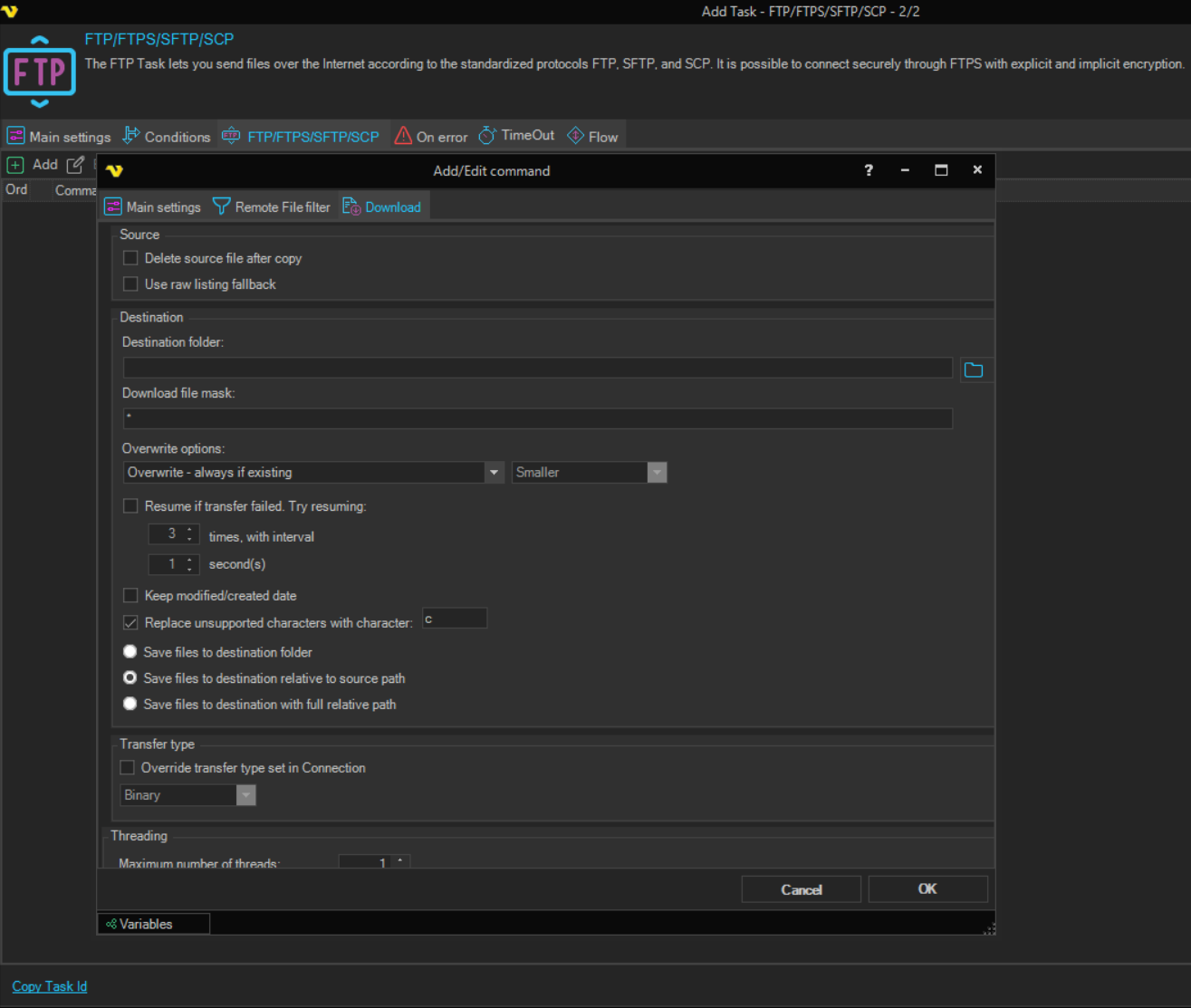
Delete source file after copy
When checked, the original file on the server is deleted after it has been downloaded. Default is unchecked.
Use raw listing fallback
When checked, uses a raw listing mode compatible with older *nix servers that have problems with the LIST command. Try this option if download fails. Default is unchecked.
Destination folder
The local folder (or network drive) where the file(s) should be saved.
Download file mask
An additional file name filter applied to matched files. Use * to include all files, or specify a pattern (e.g. *.csv). Default is *.
Overwrite options
Controls what happens when a file with the same name already exists at the destination. Options:
- Overwrite - always if existing (default) — always replace the destination file
- Overwrite - if newer — replace only if the source file is newer
- Overwrite - if destination size is — replace based on size comparison (activates the size dropdown below)
- Append if destination is smaller - otherwise overwrite — append bytes until size matches source; if not smaller, overwrite
- Append if destination is smaller - otherwise overwrite if newer — append bytes until size matches; if not smaller, overwrite only if source is newer
- Append if destination is smaller - otherwise skip — append bytes until size matches; if not smaller, skip the file
- Append if existing - otherwise create — append to an existing file, or create a new file if it does not exist
- Append if existing - otherwise skip — append to an existing file; skip if the file does not exist at the destination
- Do not overwrite if existing — skip the file if it already exists at the destination
Overwrite size
Active only when Overwrite options is set to "Overwrite - if destination size is". Specifies the size condition for overwriting. Options: Same, Smaller, Larger, Smaller or larger, Different.
Resume if transfer failed. Try resuming
When checked, VisualCron appends to the partially downloaded file and retries on failure. Set the number of retry attempts and the interval in seconds between retries. Default for both is 999.
Keep modified/created date
When checked, the downloaded file's modified and created timestamps are set to match those on the remote server. Default is unchecked.
Replace unsupported characters with character
When checked, any character in the file name that is unsupported by the Windows file system is replaced with the specified character.
Save files to destination folder
All matched files are saved directly into the root of the destination folder, regardless of sub-folder structure.
Save files to destination relative to source path
Sub-folders are recreated relative to the source folder in the remote file filter. For example, if source is /ftp/download, destination is c:\test, and a file resides in /ftp/download/subfolder, it is saved as c:\test\subfolder\filename.
Save files to destination with full relative path
Sub-folders are recreated by appending the full remote path to the destination. For example, if source is /ftp/download, destination is c:\test, and a file resides in /ftp/download/subfolder, it is saved as c:\test\ftp\download\subfolder\filename.
Maximum number of threads
The number of simultaneous download threads. Default is 1, maximum is 8.
Override transfer type set in Connection
When checked, the transfer type for this command overrides the setting configured in the Connection. Select the desired transfer type from the dropdown.
Credential
Select a Credential if downloading to a network drive that requires authentication.